Currently, you can export translations directly from Shopify. To do this, please follow the steps below. Note that translations must be entered manually first in Convercy before exporting them.
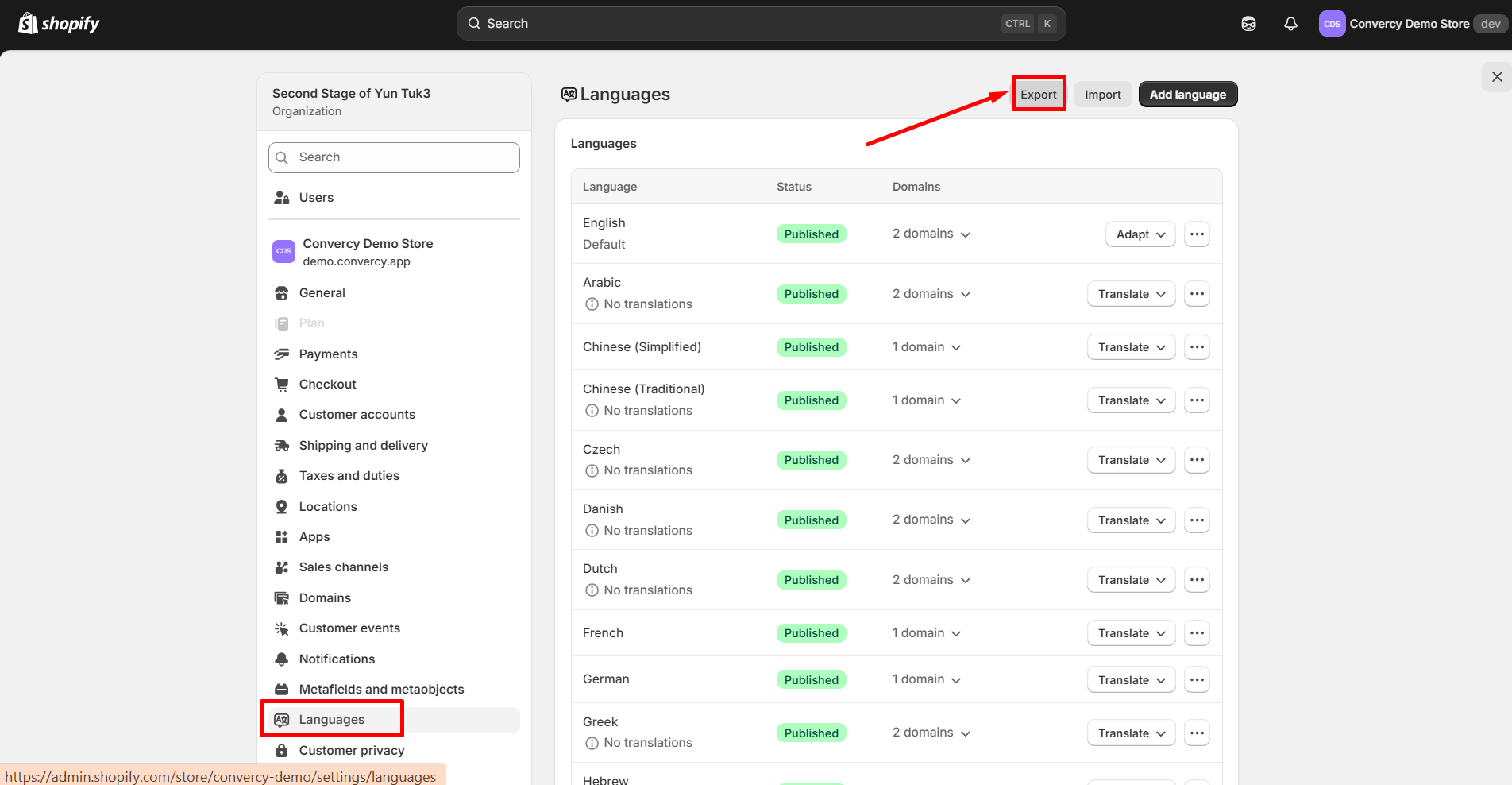
Steps to Export Translations
Go to your Shopify Admin.
In the left sidebar, scroll down and click Languages.
On the Languages page, click the Export button in the top-right corner.
A dialog will appear asking you to select the language(s) you want to export.
Choose the desired language(s), then click Export.
Shopify will either send you a CSV file via email or allow you to download it directly, depending on the file size.
This allows you to download the translations that were previously added and managed through Convercy.
Important note: Only manual translations which have been made in-app will be saved in Shopify Languages and can be exported.
For the auto-translation (users have not made and save translation in-app), there is no saved translation to be exported.
If you need any assistance, please contact our support team at support@convercy.app.
Was this article helpful?
That’s Great!
Thank you for your feedback
Sorry! We couldn't be helpful
Thank you for your feedback
Feedback sent
We appreciate your effort and will try to fix the article